Jedno polecenie. Node działa, host nim steruje.
Wklej na maszynie, którą chcesz podłączyć. Instalator pobierze urirun, uruchomi node w tle i odda hostowi pełną kontrolę — provisioning przez mesh, bez SSH.
Podłącz tę maszynę
curl -fsSL https://get.urirun.com/node.sh | bashwget -qO- https://get.urirun.com/node.sh | bashirm https://get.urirun.com/node.ps1 | iex
Działa od razu: node startuje w tle na porcie 8765 (zajęty → następny wolny),
pliki w ~/.urirun-node, a host może nim w pełni sterować i zdalnie doinstalować
konektory (--manage jest domyślne). Sterowanie ekranem tej maszyny:
dopisz -s -- --connectors kvm. Wszystkie parametry — w zakładce
Zaawansowane.
Komputer, który steruje
curl -fsSL https://get.urirun.com/host.sh | bashwget -qO- https://get.urirun.com/host.sh | bash
Potem podłącz node jedną komendą:
urirun host add-node laptop=http://NODE_IP:8765 — host widzi jego trasy
i steruje wszystkim (instalacja konektorów, flow, logi). Szczegóły w
Zaawansowane. Interfejs graficzny: app.
Komputer sterujący
Uruchom na komputerze, z którego chcesz zarządzać node'ami i flow.
curl -fsSL https://get.urirun.com/host.sh | bash -s -- --name studioHost z dodaniem node'a
Użyj, gdy znasz adres node'a w LAN.
curl -fsSL https://get.urirun.com/host.sh | bash -s -- --name studio --add-node laptop=http://NODE_IP:8765Po instalacji: ustaw raz, używaj bez --config
URIRUN_MESH_CONFIG działa na każdym urirun ≥ 0.4 — koniec z "(none)".
export URIRUN_MESH_CONFIG=~/.urirun-host/mesh.json
export PATH=~/.urirun-host/.venv/bin:$PATH

urirun host nodes        # zarejestrowane node'y
urirun host routes       # URI, które wystawia każdy node
urirun host agents       # narzędzia MCP / karty A2A
urirun host dashboard serve   # panel operatora
Steruj node'em bez RDP
Wywołaj realną trasę. Nazwa w URI = nazwa node'a (--name lub hostname) — sprawdź /routes.
curl -s http://NODE_IP:8765/routes | python3 -m json.tool   # zobacz dokładne URI

curl -s -X POST http://NODE_IP:8765/run -H 'Content-Type: application/json' \
-d '{"uri":"shell://NODE_NAME/command/uname","payload":{}}'Komputer wykonawczy
Uruchom na laptopie, serwerze lub maszynie, która ma wykonywać komendy URI.
Start w tle i --manage (host zdalnie doinstaluje/naprawi konektory przez mesh,
bez SSH) są domyślne — flagi podajesz tylko, by coś zmienić.
curl -fsSL https://get.urirun.com/node.sh | bash -s -- --name laptopForeground
Szybki test w terminalu — node przypięty do sesji.
curl -fsSL https://get.urirun.com/node.sh | bash -s -- --foregroundBoot service
Linux systemd user lub macOS launchd, start po restarcie.
curl -fsSL https://get.urirun.com/node.sh | bash -s -- --name laptop --serviceNode z connectorami
Od razu dodaje trasy HTTP check i time-tools do registry.
curl -fsSL https://get.urirun.com/node.sh | bash -s -- --name laptop --connectors http-check,time-toolsKontrola pulpitu (screen + input)
Node ze sterowaniem ekranem — zrzut ekranu, klik, pisanie (connector kvm).
curl -fsSL https://get.urirun.com/node.sh | bash -s -- --name laptop --connectors kvm
Zrzut ekranu na GNOME-Wayland działa headless przez backend
mutter ScreenCast (omija portal — bez okna zgody na każdy zrzut).
--connectors kvm automatycznie doinstaluje potrzebne pakiety
systemowe (GStreamer + PipeWire + python3 gi/dbus) przez apt/dnf/pacman/zypper (z sudo,
gdy nie root) — więc świeży node łapie realny ekran, nie czarną klatkę z
portalu. Pomijasz auto-instalację przez URIRUN_NODE_NO_DESKTOP_DEPS=1.
Wejście (klik/pisanie) wymaga ydotool/xdotool/wtype.
Wywołuj trasy na node
Node wystawia HTTP: /health (stan), /routes (dokładne URI + schematy) i POST /run (wywołanie). Najpierw zobacz co serwuje, potem wołaj {uri, payload}.
# zobacz co node serwuje (nazwa, liczba tras, dokładne URI + schematy)
curl -s http://NODE_IP:8765/health | python3 -m json.tool
curl -s http://NODE_IP:8765/routes | python3 -m json.tool

# wywołaj trasę: POST /run {uri, payload}
curl -s -X POST http://NODE_IP:8765/run -H 'Content-Type: application/json' \
  -d '{"uri":"env://laptop/runtime/query/health","payload":{}}'
curl -s -X POST http://NODE_IP:8765/run -H 'Content-Type: application/json' \
  -d '{"uri":"shell://laptop/process/command/run","payload":{"command":"uname -a"}}'
Z hosta przez mesh
routes pokazuje, ask zamienia zdanie na URI flow i wykonuje.
HC=~/.urirun-host/mesh.json
urirun host nodes  --config "$HC"          # zarejestrowane node'y
urirun host routes --config "$HC"          # dokładne URI każdego node'a
urirun host ask "sprawdz stan laptopa i zapisz notatke" --execute --config "$HC"
Trasy są namespace'owane pod --name node'a (domyślnie hostname). URI z {host}/{session} to szablony — podstaw nazwę. Trasy konektorów (kvm, him, browser, urioffice) wymagają wdrożenia kodu (--connectors przy instalacji albo host deploy); bez tego /run zwróci Route not found. Granicą bezpieczeństwa są --allow globy węzła + schemat wejścia każdej trasy.
Podgląd logów na żywo (/events / host watch)
Node strumieniuje każde /run i każdy błąd jako zdarzenia (SSE na GET /events). Z hosta — przez mesh, działa też zdalnie zza NAT:
HC=~/.urirun-host/mesh.json
urirun host watch laptop --config "$HC"                  # ciągły strumień zdarzeń
urirun host watch laptop --scheme kvm,him,error --config "$HC"   # tylko wybrane schematy
urirun host watch laptop --follow --config "$HC"         # reconnect po zerwaniu + replay
curl -N http://NODE_IP:8765/events                       # surowo, bez CLI
Strumień daje wiersze typu data: {"event":"run","uri":"…","ok":true} oraz {"event":"error","uri":"error://local/E-…","message":"…"}. /health pokazuje pole events = liczba podłączonych słuchaczy.
Historia: log sesyjny i błędy
Bez strumienia — ostatnie wpisy i rekordy error://, też zdalnie przez HTTP.
curl -s -X POST http://NODE_IP:8765/run -H 'Content-Type: application/json' \
  -d '{"uri":"log://laptop/session/query/recent","payload":{"limit":20}}'   # klucz "logs"
curl -s http://NODE_IP:8765/errors                       # ostatnie błędy (error://)
curl -s "http://NODE_IP:8765/errors/search?q=Route"      # wyszukiwanie w błędach
Surowy stdout/stderr procesu (na maszynie node)
Wymaga dostępu lokalnego — zależnie od trybu uruchomienia.
tail -f ~/.urirun-node/node.log              # --background (nohup) oraz macOS launchd
journalctl --user -u urirun-node -f # --service (systemd --user)Zdalne provisionowanie bez SSH (klucz SSH)
Świeży node (≥ 0.4.21) ma POST /deploy włączone domyślnie z autoryzacją kluczem SSH — jak ssh-copy-id, bez współdzielonego tokenu. Zarejestruj swój klucz raz, potem wypychaj trasy/kod podpisane kluczem.
uri-copy-id NODE_IP                       # enroll ~/.ssh/id_ed25519 na node (trust-on-first-use)
urirun host copy-id --all                 # …albo na wszystkie node'y w mesh naraz
Wypchnij trasy/kod (podpisane, bez tokenu)
Node hot-swapuje serwowany registry — bez restartu, bez SSH.
urirun host deploy laptop --bindings my.bindings.json \
  --code my_handlers.py --identity ~/.ssh/id_ed25519
Token zamiast klucza
Alternatywa: przypnij token na node i podaj go przy deployu.
curl -fsSL https://get.urirun.com/node.sh | bash -s -- --name laptop --admin-token SEKRET
urirun host deploy laptop --bindings my.bindings.json --token SEKRETInstaluj na node z hosta przez URI (node:// --manage)
Z --manage node odsłania admin-bramkowane trasy node://, więc instalujesz pakiety i konektory do jego własnego venv — z hosta, przez URI, bez SSH i bez skryptu lokalnego. Instalacja to wykonanie dowolnego kodu, więc te trasy są poza otwartą listą /run i wymagają podpisu Twoim kluczem (lub tokenu).
# na node: --manage jest domyślne (wymaga deploy-auth: klucz lub token)
curl -fsSL https://get.urirun.com/node.sh | bash -s -- --name laptop

# z hosta (podpisane Twoim wpisanym kluczem ~/.ssh/id_ed25519, albo --token):
urirun run node://laptop/runtime/query/info                                   --execute
urirun run node://laptop/package/query/list    --payload '{"match":"urirun"}' --execute
urirun run node://laptop/package/command/install \
        --payload '{"spec":["uricontrol","urirun-connector-time-tools"]}'      --execute
urirun run node://laptop/connector/command/install --payload '{"id":"http-check"}' --execute
node://N/runtime/query/info | interpreter, venv, wersja urirun |
node://N/package/query/list | zainstalowane pakiety (filtr match) |
node://N/package/command/install | pip install specyfikacji (PyPI / git+… / ścieżka) do venv node'a |
node://N/connector/command/install | instaluje urirun-connector-<id> |
Pakiety trafiają do własnego interpretera node'a (sys.executable), więc są od razu importowalne przez handlery. To domyka pętlę: brakujący konektor naprawiasz URI, nie logowaniem. Bez --manage (albo bez deploy-auth) trasy node:// nie istnieją i /run zwraca 403/404.
Wykryj i zatrzymaj node'y
node.sh przy zajętym porcie startuje na następnym (8765 → 8766 …), więc instancje się mnożą. Te komendy je wykrywają i sprzątają.
urirun node list                          # każdy node na tej maszynie (dowolny port)
urirun node list --host NODE_IP --ports 8765-8815   # zdalnie: skan zakresu
urirun node stop --port 8766              # zatrzymaj jedną instancję (powtarzalne)
urirun node stop --all                    # zatrzymaj wszystkie tutaj
Zatrzymaj usługę rozruchową (--service)
Node z --service odradza się po node stop — trzeba zatrzymać jednostkę systemd/launchd.
# Linux (systemd --user):
systemctl --user status urirun-node          # stan + PID
systemctl --user stop urirun-node            # zatrzymaj (do następnego logowania)
systemctl --user disable --now urirun-node   # zatrzymaj i WYŁĄCZ autostart
journalctl --user -u urirun-node -f          # logi na żywo

# macOS (launchd):
launchctl unload ~/Library/LaunchAgents/com.ifuri.urirun-node.plist
Nazwę usługi zmienia URIRUN_NODE_SERVICE_NAME (domyślnie urirun-node). Node uruchomiony przez --background (bez usługi) zatrzymasz samym urirun node stop --all.
Node na Windows
irm https://get.urirun.com/node.ps1 | iexMinimalny przepływ host + node
# 1. Na komputerze node:
curl -fsSL https://get.urirun.com/node.sh | bash -s -- --name laptop

# 2. Na komputerze host:
curl -fsSL https://get.urirun.com/host.sh | bash -s -- --name studio --add-node laptop=http://NODE_IP:8765
~/.urirun-host/.venv/bin/urirun host routes --config ~/.urirun-host/mesh.jsonNL do URI flow
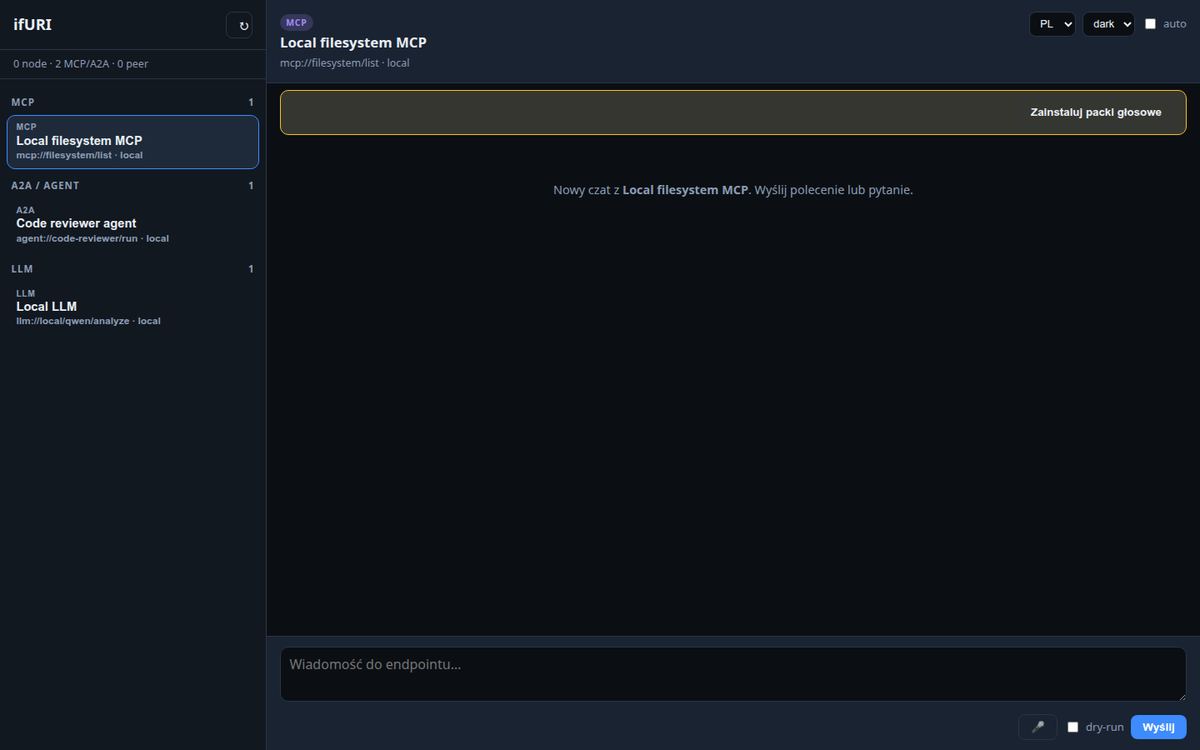
~/.urirun-host/.venv/bin/urirun host ask "sprawdz stan laptopa i zapisz notatke" --execute --config ~/.urirun-host/mesh.jsonPo instalacji: jeden interfejs do MCP, A2A i LLM
Linki do skopiowania
- https://get.urirun.com/node.sh
- https://get.urirun.com/host.sh
- https://get.urirun.com/node.ps1
- https://github.com/if-uri/get
- raw.githubusercontent.com/if-uri/get/main/node.sh
- raw.githubusercontent.com/if-uri/get/main/host.sh
Raw GitHub URL zostaje jako awaryjny fallback, gdy domena lub Plesk sa niedostepne.